
Choosing a smart home platform is a choice between convenience and control. Samsung SmartThings is a managed platform designed to connect compatible devices with relatively little configuration. Home Assistant is a highly customizable system that can run automations locally and bring together devices across many brands, but it asks more of the person setting it up.

Get furniture and decor delivered free with Prime
- Fast, free delivery on millions of items
- Prime Video, Amazon Music and more included
- Member-only deals all year

Amazon Echo Hub 8-inch Smart Home Control Panel
- ✔ Display: 8-inch touchscreen, 1280 × 800
- ✔ Connectivity: Dual-band Wi-Fi, Bluetooth, Zigbee, Thread, Matter, Amazon Sidewalk
- ✔ Audio: Pair of top-ported full-range speakers with stereo playback
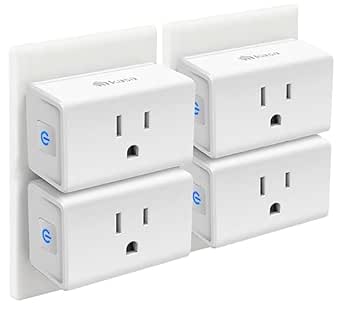
Kasa Smart Plug Mini EP10P4, 15A, 4-Pack
- ✔ Model: EP10P4
- ✔ Pack size: 4 plugs
- ✔ Maximum current: 15 A

Kasa Smart Plug HS103P4, 4-Pack, Wi-Fi Outlet, Works with Alexa and Google Home
- ✔ Model: HS103P4
- ✔ Pack size: 4 plugs
- ✔ Operating voltage: 120 V AC
Both can coordinate lights, sensors, switches, and other connected devices. The difference shows up when a device is unsupported, an internet connection fails, or you want an automation to behave in a very specific way. Choose SmartThings if you want a supported system that is easier to maintain; choose Home Assistant if you are comfortable managing a hub and value local control and customization.
At a Glance
| Criteria | Samsung SmartThings | Home Assistant | Winner |
|---|---|---|---|
| Setup and maintenance | Guided, managed setup; less ongoing upkeep | More setup choices and ongoing maintenance, especially for advanced configurations | A |
| Device compatibility | Broad mainstream support; compatibility depends on the device and platform integrations | Very broad integration options, though setup quality varies by integration | B |
| Automation flexibility | Accessible rules and routines for common household tasks | Deep customization, complex logic, and extensive community add-ons | B |
| Local operation and internet dependence | Some functions may depend on cloud services or internet access | Many automations can run locally, depending on devices and integrations | B |
| Privacy and data control | Less direct control over platform data flows | More control over where the system runs and how it is configured | B |
| Cost and value | Low entry cost when using supported hardware; costs can depend on chosen hub and devices | Software is free; a dedicated hub, accessories, or the user’s time may add cost | Depends |
Amazon Echo Hub 8-inch Smart Home Control Panel
The Echo Hub is the most complete automation choice here because it gives us both a dedicated touchscreen and built-in support for multiple smart home connections. We can arrange and resize controls on its dashboard, making frequently used devices and routines easier to reach than they are through a phone app alone. Zigbee, Thread, and Matter support also give it a broader role in a compatible setup than either Kasa plug pack, which connects over Wi-Fi.That breadth makes this the natural pick when we want one fixed place to manage compatible devices, cameras, routines, security systems, and media. The 8-inch, 1280 × 800 display offers a shared interface for a household, and the included wall mount and power adapter help with installation. Its proximity and ambient-light sensors support a panel that can respond to the room, while privacy controls include a mic-off button.Compared with the EP10P4 and HS103P4, the Echo Hub is a control center rather than a simple way to automate individual outlets. That distinction is also its main drawback: it needs a permanent location and an internet connection for setup. Buyers may need to add a tabletop stand, cable pass-through, or PoE converter depending on how they plan to install it. We’d skip it if our main goal is only to schedule a few lamps; either Kasa pack is a more direct fit for that job.
Pros:
- Customizable dashboard with rearrangeable and resizable device controls.
- Built-in support for Wi-Fi, Bluetooth, Zigbee, Thread, and Matter devices.
- Wall mount and power adapter are included.
- Includes a mic-off button and other privacy controls.
Cons:
- Internet access is required for setup.
- Designed for fixed use rather than handheld or portable control.
- Tabletop stand, cable pass-through, and PoE converter are sold separately.
Best for: Households building a compatible smart home that want a fixed, shared touchscreen for device controls and routines.
Not ideal for: People who need a portable controller, lack reliable internet for setup, or only want to automate a few plug-in appliances.
Bottom line: Choose the Echo Hub when we want a dedicated control point and broader compatible-device connectivity; choose a Kasa plug pack when outlet schedules are all we need.
“Choose the Echo Hub when we want a dedicated control point and broader compatible-device connectivity; choose a Kasa plug pack when outlet schedules are all we need.”
Kasa Smart Plug Mini EP10P4, 15A, 4-Pack
The EP10P4 earns its place for a small but practical reason: its compact design can leave the second outlet available on a standard wall socket. That helps when we want to automate a lamp or small appliance without sacrificing a neighboring plug. Like the HS103P4, it connects over 2.4 GHz Wi-Fi and needs no hub, so it is a simpler entry point than the Echo Hub when our automation needs are limited to devices connected at the outlet.Schedules and timers cover recurring routines, while Away Mode adds a way to vary connected-device activity when we are out. The plug supports up to 15 A and 1,800 W, and its UL certification and flame-retardant materials are useful considerations for a device that remains plugged in. Control is available through the Kasa or Tapo app, with voice support for Alexa and Google Assistant.Compared with the HS103P4, the EP10P4 makes more sense when outlet clearance and Away Mode matter. Both packs target everyday plug-in automation, and neither replaces the Echo Hub’s broader role as a central interface for compatible devices. The EP10P4 also depends on 2.4 GHz Wi-Fi and an app for setup and control. We would not choose it for a device that needs a different connection type or for automation beyond the stated plug functions.
Pros:
- Compact shape can leave a neighboring outlet available on a standard wall socket.
- Supports schedules, timers, and Away Mode.
- Four plugs per pack, with up to 15 A and 1,800 W support.
- UL certified and made with flame-retardant materials.
Cons:
- Requires a 2.4 GHz Wi-Fi connection.
- Kasa or Tapo app is required for setup and app control.
- Automation is limited to devices connected through the plugs.
Best for: People who want to automate several lamps or small appliances while keeping adjacent outlets usable where the plug fits.
Not ideal for: Buyers who want a central touchscreen controller, need a plug that does not rely on 2.4 GHz Wi-Fi, or prefer not to use an app.
Bottom line: The EP10P4 is the more considered Kasa choice when compact outlet use and Away Mode matter more than a central control panel.
“The EP10P4 is the more considered Kasa choice when compact outlet use and Away Mode matter more than a central control panel.”
Kasa Smart Plug HS103P4, 4-Pack, Wi-Fi Outlet, Works with Alexa and Google Home
The HS103P4 is the uncomplicated pick for turning several everyday appliances into scheduled or remotely controlled devices. Its four-plug pack needs no separate hub, and we can manage connected lamps, fans, humidifiers, and other appliances through the Kasa app or by voice using Alexa or Google Assistant. Timers and schedules make it useful for repeatable routines, such as switching a lamp on at a regular time.Compared with the EP10P4, this model offers the same basic appeal of app and voice control but is described without Away Mode or the compact-outlet advantage. That makes the EP10P4 more compelling when those details matter, while the HS103P4 remains a clear option for buyers who want familiar, direct plug automation. Compared with the Echo Hub, it is much narrower: it controls what is plugged into it rather than serving as a touchscreen for a broader compatible home.Setup requires 2.4 GHz Wi-Fi, and the stated app requirements are Android 5.0 or later and iOS 10.0 or later. Each plug is rated for 120 V AC and up to 1,800 W. The supplied details list UL certification and a two-year warranty, but the product is not a fit for someone seeking a central hub or more advanced coordination across different device types. We’d choose it for practical schedules, then look to the Echo Hub if our system grows beyond outlet-level control.
Pros:
- Four plugs provide outlet-level control without requiring a separate hub.
- Supports app and voice control through Alexa and Google Assistant.
- Schedules and countdown timers automate recurring use.
- UL certified and includes a two-year warranty.
Cons:
- Requires a 2.4 GHz Wi-Fi connection.
- App control requires Android 5.0 or later or iOS 10.0 or later.
- Does not provide the Echo Hub’s broader device coordination or the EP10P4’s stated Away Mode.
Best for: Buyers who want a four-pack for basic app, voice, timer, and schedule control of compatible plug-in appliances.
Not ideal for: People who need a central smart home dashboard, Away Mode, or operation without 2.4 GHz Wi-Fi and a compatible app.
Bottom line: The HS103P4 suits basic multi-outlet schedules, while the EP10P4 adds a more compact format and Away Mode and the Echo Hub covers a wider setup.
“The HS103P4 suits basic multi-outlet schedules, while the EP10P4 adds a more compact format and Away Mode and the Echo Hub covers a wider setup.”
As an Amazon Associate we earn from qualifying purchases.
Key Differences
The central tradeoff is how much work you want to take on. SmartThings handles more of the platform decisions for you, which makes routine household automations easier to get running. Home Assistant gives you more room to adapt the system, combine devices, and build detailed rules. That flexibility is useful when your setup has unusual requirements, but it can mean troubleshooting integrations and maintaining the system yourself.
Compatibility is not just a count of supported brands. SmartThings can be straightforward when a device is supported by its platform, while Home Assistant can connect to a wider range of products through integrations. Those integrations may differ in reliability and setup effort. Home Assistant also offers stronger opportunities for local operation and data control, though the result depends on which devices and integrations you choose. For a household that wants dependable basics with little attention, SmartThings is the more practical starting point. For someone who enjoys tuning a system and values control, Home Assistant has the higher ceiling.
Detailed Comparison
Setup and maintenance (Samsung SmartThings wins — major)
SmartThings wins for a typical first-time setup. Its managed approach and routines reduce the number of decisions needed to connect common devices. Home Assistant can be installed in several ways and supports more customization, but that choice brings setup and maintenance work. The gap is major for households that want a system to run with little technical attention; it matters less to a hobbyist who enjoys managing a hub.
Device compatibility (Home Assistant wins — moderate)
Home Assistant wins on breadth because its integration ecosystem can connect devices and services that may not fit neatly into one commercial platform. SmartThings remains capable for mainstream, supported devices, and may be simpler when a product is explicitly compatible. The gap is moderate: Home Assistant expands options, but a community integration can require troubleshooting, while SmartThings support can be more predictable for its intended devices.
Automation flexibility (Home Assistant wins — moderate)
Home Assistant wins for complex or highly specific automations. It allows more detailed conditions and customization, while SmartThings is well suited to everyday routines such as turning on lights when a sensor detects motion. The difference is major only if you want advanced logic or unusual device combinations. For simple schedules and triggers, SmartThings may be easier without giving up anything you need.
Local operation and internet dependence (Home Assistant wins — moderate)
Home Assistant has the advantage because many automations can be configured to run within the home, reducing dependence on remote services. The exact result depends on device protocols and integrations; some products still rely on their manufacturer’s cloud. SmartThings may use cloud services for some functions, so internet availability can matter. This is a moderate difference for most homes and a major one where offline operation is a firm requirement.
Privacy and data control (Home Assistant wins — moderate)
Home Assistant wins for users who want direct control over the hub and its configuration, especially when they run it locally. That control can reduce reliance on a platform provider, but it does not automatically make every connected device private; device and integration choices still matter. SmartThings is managed through Samsung’s platform, offering less hands-on control over how the system is configured. The gap is moderate for privacy-focused users and minor for those who prioritize ease.
Cost and value (moderate difference)
Neither platform is the universal value winner. Home Assistant software is free, but a dedicated computer or hub and the time spent configuring it can raise the real cost. SmartThings may be less demanding to get started with when you already own compatible equipment, though supported hardware and devices still carry costs. The gap is minor until you account for your time: choose SmartThings for lower effort, or Home Assistant if its control and flexibility justify the setup work.
Samsung SmartThings: Pros and Cons
Pros:
- Simpler path to common household routines
- Managed experience requires less ongoing technical attention
- Works well when devices are supported by the platform
Cons:
- Less room for deep customization
- Some functions may rely on internet or cloud services
- Device options depend on platform support
Home Assistant: Pros and Cons
Pros:
- Broad integration possibilities across device brands and services
- Detailed automation logic and extensive customization
- More opportunity for local operation and direct system control
Cons:
- Setup and maintenance can require technical effort
- Integration quality and reliability can vary
- Hardware and configuration time can add to the total cost
Who Should Choose What
Choose Samsung SmartThings if:
- You want lights, sensors, and routines working with minimal setup.
- Your devices are already supported by SmartThings and you prefer a managed platform.
- Other household members need a system that is straightforward to use and maintain.
Choose Home Assistant if:
- You want to combine devices or services that one commercial platform does not support well.
- You value local control, privacy choices, or continued operation during internet disruptions.
- You enjoy configuring automations and can take responsibility for upkeep.
Skip both if: You only need a few devices controlled individually through their own apps, or you do not want a central platform to configure and maintain.
Value for Money
Home Assistant can be the better value when you already have suitable hardware, want to connect a varied device collection, and are willing to spend time configuring it. Its software does not require a platform subscription, but hardware, troubleshooting, and maintenance are part of the real cost. SmartThings can be worth paying for when its supported setup saves you time and provides the routines your household needs. Pay more for Home Assistant’s capabilities only if you will use its flexibility or local control; for basic automations, SmartThings is often the better value in effort.
Final Verdict
For most people who want a practical smart home without turning it into a technical project, choose Samsung SmartThings. It is the better fit for common devices and routines when ease and lower maintenance matter most. Choose Home Assistant if you specifically want broader integrations, deeper automation, or more control over local operation and accept the work that comes with them. The deciding factor is not how many features you could configure; it is whether you want to manage the system yourself.
Frequently Asked Questions
Is SmartThings easier to set up than Home Assistant?
Generally, yes. SmartThings is a managed platform with a more direct path for supported devices and routine automations. Home Assistant offers more setup choices and customization, which can require extra configuration and upkeep.
Which platform supports more smart home devices?
Home Assistant generally offers broader integration options across brands and services. Actual support and reliability vary by device and integration. SmartThings can be the simpler choice when your specific devices are supported directly.
Can Home Assistant work without an internet connection?
Many Home Assistant automations can run locally, but offline behavior depends on the devices and integrations involved. A device that relies on its manufacturer’s cloud may still need internet access.
Is Home Assistant cheaper than SmartThings?
The software is free, but Home Assistant may require a hub or other hardware and time for setup and maintenance. SmartThings can cost less in effort, especially if you already own compatible equipment. The better value depends on whether you value flexibility or convenience more.